Your lab's animals, stocks and supplies.
In one place.

BioManager replaces the spreadsheets, whiteboards and paper cage cards most labs run on. Edit records like a spreadsheet — underneath is a database that knows which mouse is in which cage, when a litter needs weaning, and which antibody is about to expire.

macOS · Windows · Linux · Android · any browser  ·  MIT licence  ·  your data stays on your computer or your lab's own server

🐭 Mice🐟 Zebrafish🪰 Flies🪱 Worms 🧬 Plasmids🧫 Samples🛒 Orders⚗️ Reagents 🔬 Antibodies🦠 Viruses🧬 Primers🧫 Cell lines📅 Calendar📓 Notebook
BioManager — Home
BioManager's home page: mice older than 30 weeks, upcoming weanings, the genotyping queue, fly vials due, expiring reagents and the next 14 days

Home: every morning, what needs doing today.

🧑‍🔬

For lab members

Manage your own lines, fish, stocks and samples without hunting through someone else's spreadsheet.

📋

For lab managers & PIs

A census that is actually complete: who owns what, which cages are idle, what is overdue.

🧬

For multi-organism labs

Mice, fish, flies and worms side by side — and a database for any other organism, set up in minutes.

The tour

Built around how a lab actually works.

🐭 Mouse colony

Every mouse in a sheet you edit in place: sex, age, status, transgenes, cage, rack and owner. IDs are assigned in order and never reused.

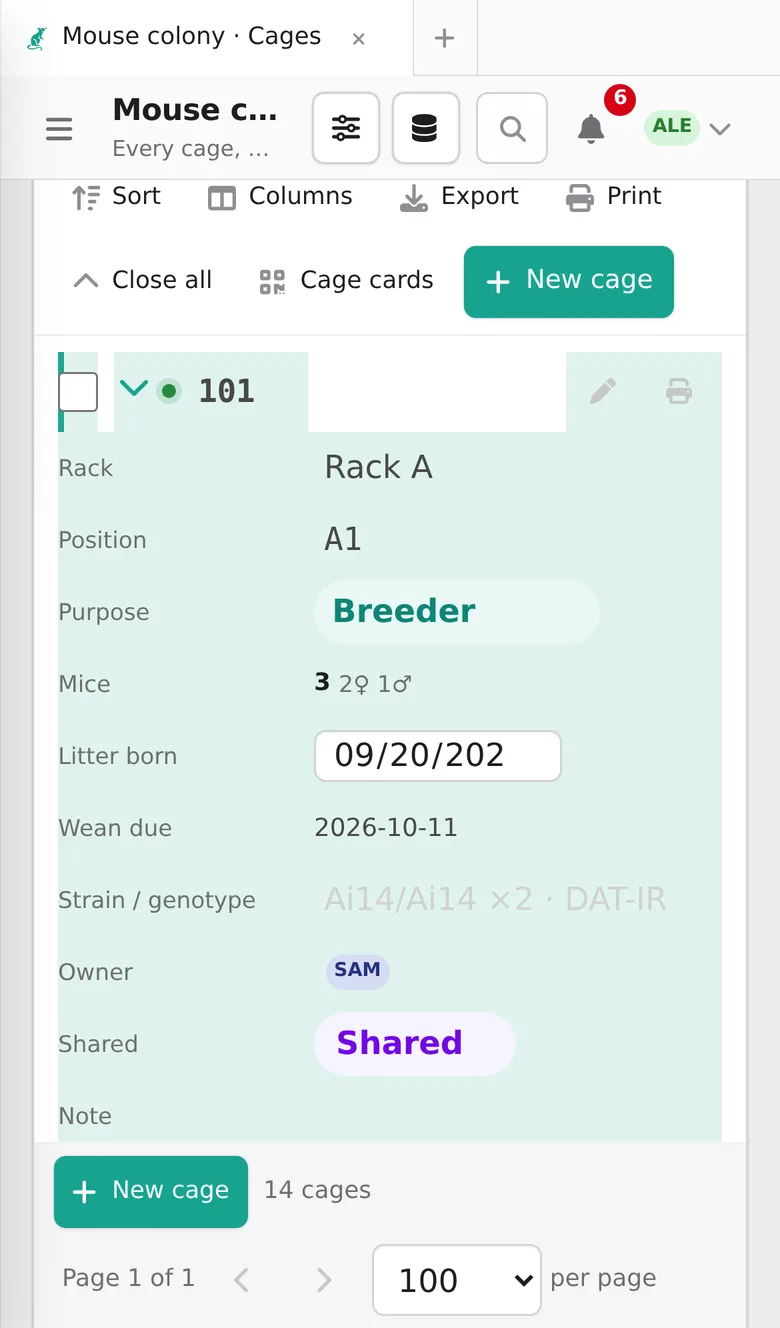
  • Cages with their mice, purpose, rack position and P21 weaning date
  • Litters: record a birth once; weaning and genotyping dates follow
  • Breeders past 30 weeks flagged, experiments with treatment groups
  • Experiments: record each manipulation — tamoxifen 20 mg/kg on day 1, HDM on days 2–5 — with each mouse's dose from its weight, follow body weight with the manipulation days marked, and compare groups day by day. Fish, flies, worms and your own organisms have them too, with survival and readouts that fit them
Mouse colony
The mouse sheet: one row per mouse with sex, age, status, transgenes, cage, rack, position and owner

🗄️ Racks, named your way

D7, 4-7, 7D, G12 or plain 1 to 80 — each rack keeps the labels on its real stickers. See what's where, and drag a cage to move it.

The same grid holds fly vials, worm plates, plasmid boxes and freezer boxes.

Rack grid
A mouse rack as a grid of positions, each filled cage showing its number and genotype

🪰 Drosophila & C. elegans

Vials and plates in racks inside incubators. Set crosses, collect eggs into new vials, and see when the progeny will be adults.

  • Flip schedules that follow temperature — 14 days at 25 °C, 28 at 18 °C
  • Each rack shows its last flip and the next, with Flipped today in one click
  • What's due shows up on Home and the calendar
  • Frozen-stock records for worms
Drosophila
Fly vials with genotype, purpose, incubator and rack

🧬 Plasmids

Upload a GenBank, FASTA or SnapGene file: the sequence and its features are kept, with an interactive map you can edit. Every tube has an address in a plasmid box.

pCAG-EGFP
A circular plasmid map with features and restriction sites beside the sequence

🧪 Samples, orders, reagents, antibodies, primers, cell lines

One engine, eight starting points. Orders move across a board from requested to received; reagents warn before they expire; antibodies keep host, clone, dilution and RRID; viruses keep serotype, titer and biosafety level, and link to the plasmid each was made from; primers work out their length, GC and Tm from the sequence; cell-line vials keep passage and mycoplasma tests. Keep your own stock apart from the lab's common shelf.

Orders
The orders board with requested, ordered, received and cancelled columns

🦎 Any other organism

Xenopus, axolotls, cell lines, yeast — choose Add database, start from a preset or a blank sheet, and describe it: the words it uses, how it's counted, what it needs (crosses, genotyping, cryo, census…), its schedules and your own columns. No code.

Only what your lab keeps appears — the mouse colony, zebrafish and plasmids are added the same way, and every database has Configure and All databases beside its name.

New database
The Add database page with presets for flies, worms, inventories and organisms

📅 Calendar & notebook

Experiments and to-dos, with weanings, genotyping, flips and reagent expiry filled in for you, alongside your Google Calendar — and on your phone's calendar too.

  • Protocol timelines from day 0: move the start and every step moves
  • Equipment booking without double bookings, repeating every day or week, and cover for time away
  • A notebook you edit together live, with protocols to run at the bench, data sheets with plots and stats, and buffer recipes
  • Link any antibody, sample, primer or plasmid from a page with @; the record lists the pages that use it
  • Sign a page when it is the record of your work: fingerprinted, locked, witnessed by a lab mate, amended only with a reason
Calendar
A month calendar with experiments, meetings, weaning and genotyping dates

At the rack

Scan the cage card.
The cage opens.

Print correctly sized cards for cages, tanks and vials, and labels for tubes — on any printer, or on a Brother or Zebra label printer. Point any phone camera at the QR code and that record opens, ready to edit — nobody walks back to a computer to type an ID.

With a lab server, use the Android app's Scan button or any phone camera.

Printable cage cards with owner, purpose, genotype and a QR code
A cage opened on a phone after scanning its card

Everywhere in the app

The details that save the afternoon.

☀️

A home page with today's jobs

Weanings, genotyping, old breeders, vials to flip, expiring stock — as cards, on a two-week ruler, or as your racks with a pull list. Customize picks and orders the cards: add your to-dos, bookings, recent pages or calculators.

🧮

41 bench calculators

Utilities: molarity and dilutions, buffer pH, A₂₆₀ and A₂₈₀, ligation and assembly, master mixes, ΔΔCt, cell seeding and MOI, OD₆₀₀, rpm ↔ × g, doses, statistics — answers as you type, with reference tables.

📊

Spreadsheet-style editing

Click a cell and type; it saves as you go. Sort, filter, export to CSV, print. New at the bottom adds an empty row to type in, and each animal's dot shows its age: blue young, green adult, red old.

📥

Bring your spreadsheets

Import from Excel on every database matches your columns by meaning — Slot, Well or Position — and shows a preview first. Or Add many: “4 females, 2 males”.

↩️

Undo for bulk changes

Every batch can be undone — unless someone edited those records since.

🕓

Full change history

Who changed what, and exactly how: genotype: DBH-Cre → ∅. Scripts, R and balances can read and write through the API, as you.

🔎

Search everything

⌘ K from anywhere, and pages open as tabs you keep; + opens your start page.

👥

Made for a whole lab

Approve members, edit what you own, share breeder cages. Project groups share animals, stock, databases, to-dos and notebook pages among themselves. Roles for animal-care staff. Sign in with Google, Microsoft or your institution.

🌗

At home on a Mac

A full menu bar with the usual shortcuts, light and dark, and Install and Restart when there's a new version — a copy of your data kept first. Works in any modern browser too.

Ways to run it

Start on your laptop. Grow into a server.

💻

Desktop app

For one person on one computer. Download, open, done. Your data is a file in your user folder, private to that computer, and moves to a server later in one step. Or share it on the lab's network, or open the lab's server in its window.

Download
🏫

Lab server — the web version

For the whole lab, from any browser, the Android app, or an iPhone's home screen. HTTPS, PostgreSQL, and backups that run nightly and are test-restored every week. Free on a cloud VM with Tailscale; an hour to set up, with every step written down — or hand it to an AI assistant.

Run it for your lab

Download

Free, and yours to keep.

BioManager is released under the MIT licence. No account, no subscription, and your records never leave your computer or server unless you connect a calendar or email. Once a day it sends its makers anonymous counts, never names, which an admin can switch off.

Read the user guide  ·  All releases and what changed

📱

On your phone

The phone apps open your lab's BioManager server — the same data as everyone in the lab, with a Scan button for cage cards. Ask your lab's admin for the server's address.

iPhone, or no app: open the server in Safari or Chrome and choose Share → Add to Home Screen (iPhone) or ⋮ → Install app (Android). On Android, allow your browser to install the .apk when it asks.

1

Unzip and move it

On a Mac, drag BioManager into Applications. On Windows, extract the folder and open BioManager.exe. On Linux, mark the AppImage executable and open it.

2

Open it the first time

macOS: right-click → Open, then Open. Windows: More info → Run anyway. They ask once, because the app isn't signed by Apple or Microsoft.

3

Set up your lab

Create your account (the first is the admin) and tick what your lab keeps. BioManager makes just those databases, then Getting started walks you through the first steps. The user guide has the rest.

Questions

Good to know.

Where is my data kept?

On your computer, outside the app, so updating or reinstalling never touches it: ~/Library/Application Support/Biomanager/ on macOS, %APPDATA%\Biomanager\ on Windows and ~/.local/share/Biomanager/ on Linux. Settings → Export my data downloads your records as a zip at any time.

Can I keep the database in Dropbox, OneDrive or iCloud?

Please don't. Sync services corrupt database files mid-write. BioManager warns you if it finds itself in a synced folder. For a lab, run it on a server instead, which everyone can use at once.

Can the whole lab use it?

Yes, on a lab server: a lab computer on your network, a university VM, or a free cloud VM with Tailscale. New sign-ups wait for an admin's approval; you edit what you own, shared cages belong to everyone in them, and every change is recorded. Every option, its cost and the steps.

How safe is our data?

A server backs up every night, restores the newest backup every week to prove it works, and can keep encrypted copies off-site and on your own computers. Bulk changes can be undone, and every edit is in the history. How the copies are kept.

Is there a phone app?

Yes, for a lab server: the Android app opens your lab's server full screen and scans cage cards. On an iPhone or iPad, open the server in Safari and tap Share → Add to Home Screen: it gets its own icon and opens full screen like an app. The desktop app on one computer is private to that computer, so phones can't reach it.

Linux: the AppImage doesn't open.

Mark it executable first (right-click → Properties → Allow executing, or chmod +x BioManager-Linux.AppImage). If it still won't start, your system may lack FUSE: install libfuse2, or use the .tar.gz and run BioManager/BioManager.

Windows 10: BioManager opened in my web browser.

Its window needs Microsoft Edge WebView2, a free part of Windows that Windows 11 includes and some Windows 10 PCs lack. BioManager offers to download it from Microsoft (choose Yes) and works in your browser meanwhile; leave its message open while you use it. Once WebView2 is installed, open BioManager again and it has its own window.

Why does my computer warn me when I first open it?

BioManager isn't signed with an Apple or Microsoft developer certificate, so the system asks you to confirm once. On a Mac, right-click the app and choose Open; on Windows, choose More info, then Run anyway.

Does it work for organisms other than mice?

Zebrafish, Drosophila and C. elegans have their own modules. For anything else, Add database lets you describe the organism — its words, how it's counted, what it needs — without any programming.

Is it really free?

Yes. BioManager is released under the MIT licence: use it, share it, change it.

I found a bug or want a feature.

Open an issue on GitHub — please say which system you're on and what you expected to happen.